Edge AI on Remote Industrial Sites – Uses, Hardware and Power
Cameras and sensors are already on most remote sites. The trouble is that nobody has time to watch hundreds of video feeds or stare at vibration trends all day, and the link back to the office is too thin to stream it all anyway. That is where running trained models right at the site starts to look useful. For industrial edge AI projects, though, the brochure version and the field version can be very different things. What is edge AI good for on a remote industrial site, and what hardware and power does it take?
Edge AI on a remote industrial site means running trained software models on local hardware so cameras and sensors can flag problems on the spot, without sending raw data to a distant data center. The most practical uses are camera analytics for safety, security and flare or leak monitoring, plus predictive maintenance.
Hardware ranges from smart cameras drawing a few watts to rugged edge computers drawing a few hundred. Power and connectivity set the limits: a solar-powered pad can run a modest edge AI setup, but data center class GPUs are far beyond what a remote site can power or cool. The winning pattern: analyze locally, send only events.
What Is Edge AI on an Industrial Site?
It is the "use" half of machine learning, done in the field. Models get trained in data centers on large sets of examples, such as thousands of images of flares, vehicles or people wearing hard hats. The trained model is then copied to a small computer at the site, where it looks at new data and makes a call: normal, or worth a look.
The appeal is speed and bandwidth. An alert raised on site does not wait for a satellite round trip, and a site that sends a ten-second clip of an event uses a tiny fraction of the bandwidth of a live feed. SPE's Journal of Petroleum Technology covered this shift in computer vision and edge computing for oil and gas, citing a Gartner estimate that 75% of enterprise data would be processed outside traditional data centers and the cloud by 2025.
What Are the Most Practical Edge AI Uses?
The best uses share three traits: a clear visual or data pattern, a real cost when it is missed, and too much data for humans to watch.
Safety and Security Cameras
Camera analytics can flag a person inside a restricted zone, a vehicle at a gate after hours, or missing hard hats and high-visibility vests. The value is fewer hours of video for someone to review and faster alerts for real intrusions.
Flare and Leak Monitoring
Models can watch a flare and flag smoke or an unlit flare, which matters for emissions and compliance. Optical gas imaging and thermal cameras can show gas plumes and hot spots, and software can help flag them for review. Whether a camera system counts toward any leak detection rule is a question for your environmental team and regulator, not a vendor brochure.
Predictive Maintenance
Compressors, pumps and generators give warning signs before they fail: rising vibration, a shift in temperature, a change in pressure patterns. Models trained on normal behavior can flag drift early. In artificial lift, pattern recognition on rod pump dynamometer cards, which plot load against position, has a long track record of spotting pump problems.
Reading Legacy Equipment
A camera pointed at an old analog gauge or sight glass can turn it into a number for SCADA, which can be cheaper than replacing the instrument on an older site.
What Hardware Runs Edge AI in the Field?
Match the hardware to the workload and the power budget. The table shows the common tiers.
| Tier | Example | Typical power | Good for |
|---|---|---|---|
| Smart camera | Camera with a built-in AI chip | A few to about 15 W | One feed, simple detections |
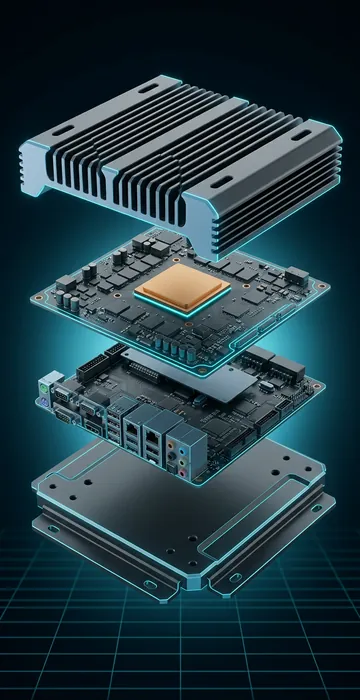
| Embedded AI module | Fanless box with a small accelerator | Roughly 10 to 60 W | Several cameras or sensor models |
| Rugged edge server | Short-depth server with a low-profile GPU | Roughly 150 to 500 W | Many feeds, heavier models |
| Data center GPU server | Multi-GPU training-class system | Several kW and up | Not a remote-site tool |
Field hardware also has to survive heat, dust, vibration and corrosive gas. The same rules apply as for any rugged edge server: rated temperature range, sealed or filtered cooling, solid-state storage and remote management.
How Much Power Does Edge AI Need?
Less than people fear for small setups, and far more than a pad can supply for big ones. Here is a worked example for a solar-powered camera post:
- Camera: 10 W, embedded AI module: 30 W, LTE router: 10 W
- Total: 50 W × 24 h = 1,200 Wh per day
- Array, with 4 winter sun hours and a 0.75 derate: 1,200 ÷ 4 ÷ 0.75 = 400 W
- Battery for 3 days at 80% depth of discharge: 1,200 × 3 ÷ 0.8 = 4,500 Wh
That is a manageable solar system. Now compare a single data center GPU. NVIDIA lists the H100 SXM at up to 700 W of maximum power. One such GPU running all day is 700 × 24 = 16,800 Wh, which on the same math needs about 5.6 kW of panels before counting the rest of the server or its cooling. That gap is why remote sites run small, efficient models and leave training to large facilities on serious power.
Those large facilities face their own constraint. Where they get built depends heavily on power, water, land and fiber, which our guide to data center site selection covers in detail.
How Do Connectivity Limits Shape the Design?
They push almost everything toward "decide locally, report briefly." A site on a metered satellite or cellular plan cannot stream video to a cloud model, but it can send an alert with a snapshot in a few hundred kilobytes.
Plan for three kinds of traffic: events and snapshots going out, occasional video clips pulled on request, and model and software updates coming in. Updates can be large, so schedule them for off-peak hours and test on one site before pushing to all of them. Keep a local recording buffer so a missed upload does not mean lost evidence.
What Goes Wrong With Edge AI Projects?
Most failures are practical, not technical. The common ones:
- False alarms from shadows, dust, rain, insects and headlights, until operators start ignoring alerts.
- Dirty or misaligned camera lenses that quietly degrade every detection.
- Models trained on other sites that do not match local lighting, equipment or layout.
- Nobody owning the alerts, so detections pile up in a dashboard no one checks.
- Undersized power, so the system browns out every winter.
Edge AI should assist people and existing safety systems, not replace them. Gas detectors, shutdown logic and trained operators stay in charge.
How Do You Keep Edge Models Accurate Over Time?
Treat a model like any other piece of field equipment: it needs inspection and maintenance. Sites change. New tanks go in, vegetation grows, a fence moves, the camera gets bumped, and the seasons change the light. A model that was accurate in spring can start missing things or crying wolf by winter.
The fix is a feedback loop. Have operators mark alerts as real or false, save a sample of those clips, and use them to retrain or tune the model in a central data center a few times a year. Then push the update to one site, check it, and roll it out. Keep a record of which model version runs where, the same way you track firmware on RTUs. That discipline is what turns a promising demo into a tool that operators trust.
How Do You Start an Edge AI Pilot?
- Pick one problem with a clear cost, such as unlit flares, after-hours intrusions or compressor failures.
- Choose two or three sites with different conditions.
- Size power and connectivity before buying hardware.
- Agree on who receives alerts and what they do with them.
- Track false alarms and missed events for at least a few months, through different seasons.
- Scale only after the alert volume is something people can actually handle.
Edge AI Industrial Projects Win Small Before They Win Big
Edge AI on remote industrial sites works best as a focused tool: camera analytics for safety, security and flare or leak monitoring, and pattern detection that catches equipment problems early. The hardware is small and efficient, and the design rule is to analyze locally and send only what matters.
Power and connectivity draw the boundary. A modest setup fits on solar, while data center class GPUs belong in data centers. Start with one costly problem, prove it through a full season, and grow from there.
Start with money. Name the single alarm or failure that costs your operation the most each year, then ask whether a camera or a sensor pattern would show it coming. If the answer is yes, you have found your first pilot.