What Is Edge Computing in the Oilfield? – Processing Data at the Pad

A modern well pad has more going on than a pumpjack nodding along. Pressure transmitters, tank level sensors, a controller in a gray box, a radio on a pole, maybe a camera. All of it makes data, and most of it used to either get thrown away or trickle back to the office a few numbers at a time. Oilfield edge computing changes where the thinking happens. So what is edge computing in the oilfield, and why process data at the pad instead of sending it all to the office?
Oilfield edge computing means running software on rugged computers at the well pad, compressor station or tank battery, so data gets analyzed where it is collected instead of being shipped raw to a distant server. The edge device reads sensors and controllers, makes local decisions or summaries, and sends only what matters over the field's limited radio, cellular or satellite link. That saves bandwidth, keeps the site working when the link drops, and gets answers in milliseconds instead of minutes. The oilfield has done a version of this for decades with pump controllers and flow computers. What has changed is that cheaper, tougher hardware can now run far more of it at each site.
What Does Edge Computing Mean on a Well Pad?
It means putting computing power close to the equipment rather than in a data center hundreds of miles away. The National Institute of Standards and Technology (NIST) describes this idea in its fog computing conceptual model, which moves data analysis out of the cloud and into the network near the devices, cutting delay. NIST even uses the term "mist computing" for the lightest layer, sitting right at the sensors.
On a pad, the layers usually look like this:
- Sensors and instruments: pressure, temperature, flow, tank level, vibration, gas detection.
- Controllers: a programmable logic controller (PLC), remote terminal unit (RTU), pump controller or flow computer that reads the sensors and runs the equipment.
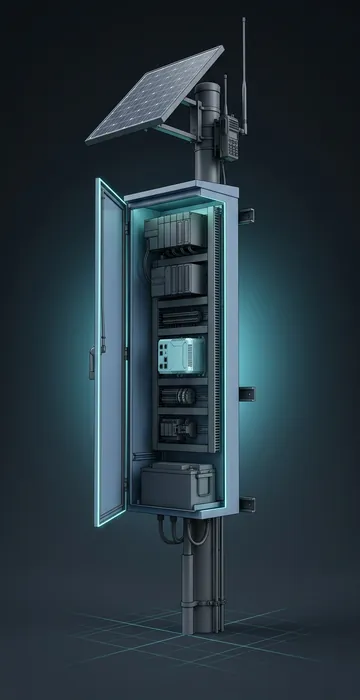
- Edge gateway or industrial PC: a small computer that gathers data from the controllers, analyzes it and decides what to send.
- Communications: a radio, cellular modem or satellite terminal.
- Back office: the supervisory control and data acquisition (SCADA) host, historians and business systems.
Edge computing lives mostly in layers two and three. Layer five is where a SCADA system pulls everything together for the control room.
Hasn't the Oilfield Been Doing This for Years?
Yes, and it is worth saying so before anyone gets sold something "new." A few examples that have been on leases for a long time:
- Pump-off controllers on rod pumps read load and position every stroke, draw a dynamometer card, and shut the pump down when the well pumps off. That is local analysis and control, done in the box on the pad.
- Flow computers at gas meters calculate corrected volumes from pressure, temperature and differential readings right at the meter, then store the results for audit.
- Plunger lift controllers time each cycle from casing and tubing pressures on site.
What has changed is scale and flexibility. Older devices did one job with fixed firmware. Today's edge gateways are general-purpose computers in tough cases, and they can run several applications at once, be updated remotely and handle high-volume data like vibration and video. The Society of Petroleum Engineers' Journal of Petroleum Technology describes the digital oil field as a mix of technology, process and people, with SCADA streaming field data into decisions. Edge computing is one of the technology pieces that makes that practical at remote sites.
Why Process Data at the Pad Instead of the Cloud?
Four reasons, and anyone who has fought a bad radio link will recognize the first one.
1. Bandwidth Is Scarce and Costs Money
Take an example. A vibration sensor on a compressor samples 20,000 times per second, 2 bytes per sample:
- Data rate: 20,000 × 2 = 40,000 bytes per second
- Per day: 40,000 × 86,400 seconds = about 3.46 billion bytes, or roughly 3.5 GB
- Eight channels on one compressor: about 28 GB per day
Pushing that over a field radio or satellite link is not realistic. An edge device can run a frequency analysis locally and send a summary, say a few hundred bytes every minute, plus a raw snapshot when something looks wrong. That turns gigabytes a day into a megabyte or two.
2. The Link Will Go Down
On a remote lease, the closest tower might be fifteen miles off, and storms, power blips and plain old interference knock links out. Equipment cannot stop thinking every time that happens. Local logic keeps pumps, compressors and safety shutdowns working, and the edge device buffers data until the link comes back.
3. Some Decisions Cannot Wait
A round trip to a distant server takes time, and over older satellite links it can take more than half a second. That is fine for a daily report and bad for anything that needs to react fast, like shutting in a well on high pressure or catching a pump problem stroke by stroke.
4. Less Exposure
Sending less raw data off site, and keeping control loops local, can reduce what is exposed to the internet. That only helps if the edge device itself is locked down, which we will get to.
What Are Common Oilfield Edge Computing Uses?
The best uses solve a problem a pumper or lease operator already has. Some favorites:
- Rod pump optimization: analyzing dynamometer cards to spot fluid pound, gas interference or worn parts, and adjusting pump speed.
- Compressor health: tracking vibration, temperatures and run hours to catch failures early.
- Tank levels and hauling: watching tank gauges and alerting when a load is ready, so trucks go where they are needed.
- Gas measurement: running flow calculations and flagging meter problems before they turn into accounting disputes.
- Leak and gas detection: combining detector readings with pressure trends and triggering shutdowns or alarms locally.
- Flare and pilot monitoring: confirming pilots are lit and logging flare volumes.
- Generator monitoring: for pads with on-site power, tracking load, fuel and engine faults.
Cameras deserve a mention. Video eats bandwidth, about 21.6 GB a day for a single 2 megabit-per-second stream. Edge software can watch for motion or changes and send only short clips or alerts, which makes security cameras workable on remote leases.
What Hardware Runs at the Edge?
Tough, small and frugal hardware. The table shows the usual lineup.
| Device | Where it sits | Typical job |
|---|---|---|
| PLC or RTU | Control panel on the pad | Reads sensors, runs equipment logic |
| Flow computer | At the gas meter | Calculates and stores gas volumes |
| Edge gateway | Pole-mounted enclosure or panel | Collects data, analyzes it, manages communications |
| Rugged industrial PC or server | Equipment building or skid | Heavier analysis, video, local historian |
What makes it rugged? Wide operating temperature ranges, sealed cases that keep dust and moisture out, no fans where possible, and approvals for hazardous locations such as Class I, Division 2 areas where flammable gas may be present during abnormal conditions. Equipment that is not rated for those areas has to sit outside them, which is a decision for whoever classified the site.
Power is the other constraint. Many pads run instruments on solar and batteries. A gateway that draws 15 watts uses 15 × 24 = 360 watt-hours a day, which can mean a bigger panel and battery than the RTU alone needed. A beefier industrial PC at 60 watts needs 1,440 watt-hours a day. That math decides a lot of hardware choices at remote sites.
How Does Edge Data Get Back to the Office?
Over whatever link the site has, using protocols built for thin pipes. Modbus is still everywhere at the controller level. MQTT, a lightweight publish-and-subscribe protocol, was created in 1999 for monitoring oil pipelines over satellite, which tells you how long this industry has been thinking about expensive bandwidth. Edge devices often use it to report by exception: send a value when it changes, not every second.
The links themselves range from licensed radio to cellular to satellite. Low Earth orbit service has made satellite a lot more attractive for remote pads, and whether Starlink for oil and gas sites is good enough depends on power, mounting and what you are asking it to carry.
What About Security?
Every edge device is a small computer on a network, which makes it a potential door into operational systems. Good practice in the oil patch looks like this:
- Keep control networks separate from business and internet traffic.
- Change default passwords and turn off services you do not use.
- Plan for remote updates, because nobody wants to drive to 300 pads to patch software.
- Log access and watch for odd traffic.
The ISA/IEC 62443 standards are the common reference for securing industrial control systems, and they are worth a look before you roll out edge devices at scale.
Oilfield Edge Computing Puts the Thinking Where the Wells Are
Oilfield edge computing is the practice of analyzing data at the pad, on rugged hardware, so remote sites can act quickly, keep running without a link and send only what matters. It grew out of tools crews already know, like pump-off controllers and flow computers, and now covers compressor health, tank hauling, gas detection, cameras and more.
Start small. Pick one problem that costs real money, like compressor failures or wasted truck trips, and put edge hardware on a few sites to solve it. Check your power budget, your hazardous area classification and your link before you buy anything. Then scale what works.